PTP Camera Control for Windows and macOS

-

How PTP Camera Control Works
View Supported PTP CamerasPicture Transfer Protocol (PTP) is a standard for communication between digital cameras and computers. Depending on the camera, PTP can provide image transfer, remote capture, live view, and camera settings control.
PTP capabilities vary by camera model and manufacturer, and some cameras use proprietary extensions. As a result, PTP recognition does not necessarily mean that every camera feature can be controlled remotely.
Visere Captura integrates PTP directly into its automated photography workflow, enabling compatible cameras to work with still capture, 360° turntable photography, focus stacking, and other supported operations.
-

Why Windows PTP Support Matters
View Supported PTP CamerasCamera control on Windows has traditionally relied on proprietary SDKs supplied by individual camera manufacturers. These SDKs can vary by brand, model, operating system, and release cycle.
Visere Captura 6.1 adds PTP camera control on Windows, providing a broader and more flexible approach to camera detection, image capture, live view, settings control, and automated photography workflows.
Manufacturer SDK control remains available for supported cameras, giving users the flexibility to choose the camera control method that works best for their equipment and workflow.


Enable PTP
From the Visere Captura gearbox, go to About and click Enable/Disable Plug-ins.
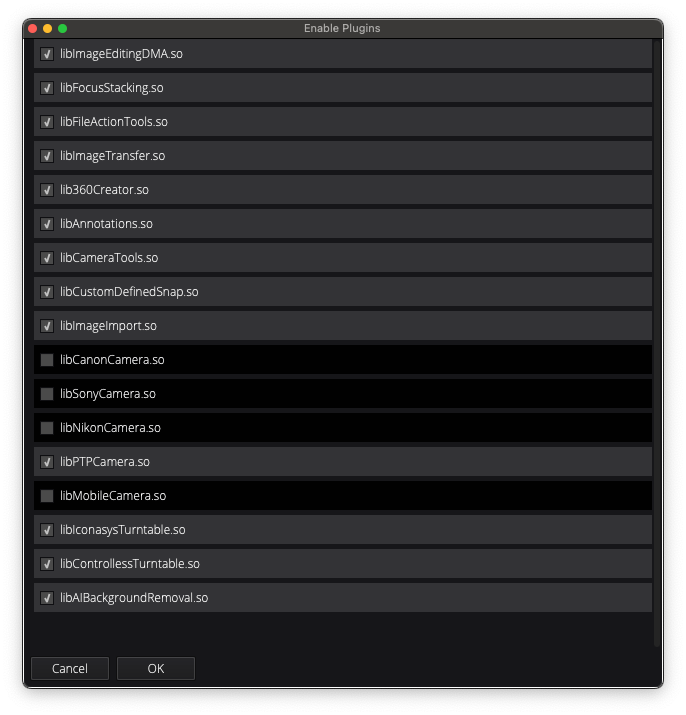
Disable Other Cameras
Visere Captura searches for cameras using the manufacturer's SDKs first. To enforce the use of the PTP library, disable the other camera libraries. Click OK and restart Visere Captura.

macOS Troubleshooting
If Mac's Preview program is running, then Visere Captura's PTP drivers cannot access the camera. Please ensure Preview is closed.